
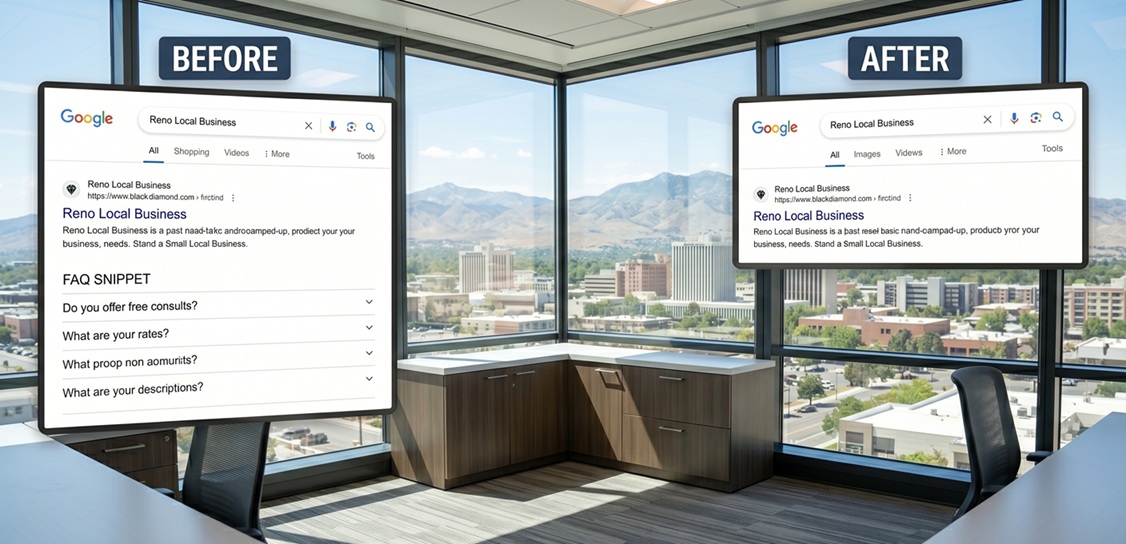
Yes, Google Just Killed FAQ Snippets: What It Means for Your Small Business
By Cap Puckhaber, Reno, Nevada
A massive shift just changed how your website looks on the internet. Because Google decided to remove FAQ snippets for almost every website, local small business owners are feeling confused. You might notice that those helpful dropdown questions no longer appear under your search listing. Since this change affects everyone, you do not need to worry about being singled out. I’m Cap Puckhaber of Black Diamond Marketing in Reno, N.V. and I want to show you why this actually creates a better opportunity for small businesses to compete. But we must understand the new rules before we can win the game. I know that chasing technical tricks is a losing battle for local companies. So I focus on real value instead of coding hacks.
Google officially ended support for FAQ rich results during the first week of May. This means your search listings will look smaller and less flashy than they used to be. Despite the visual loss, your website is not broken and your rankings should remain stable. Because big corporations spent thousands of dollars to abuse this feature, Google decided to pull the plug. They are moving toward a future where artificial intelligence provides answers directly to users. This transition feels scary for many, but it simplifies your job as a business owner. You can stop worrying about complex code and start focusing on your customers. I have seen many tech trends come and go, so trust that this is just another pivot.
Small businesses often felt pressured to hire expensive developers to manage schema code. But now that Google FAQ schema update has changed the landscape, that pressure is gone. You no longer need to pay for FAQ rich results gone alerts or monitoring tools. Because the expandable boxes are missing, searchers will spend more time looking at your actual website description. This allows your brand voice to shine through without being buried under a pile of generic questions. Since the playing field is now level, your local expertise matters more than a big budget. I believe this change forces companies to provide better content for real people. But you still need a plan to handle the loss of screen space.
What Were FAQ Snippets and Why Did They Go Away?
FAQ snippets were the expandable question links that appeared directly in search results. Because they took up a lot of room, they were great for grabbing attention. But many large companies started using them to block competitors from being seen. They would fill their pages with hundreds of irrelevant questions just to dominate the screen. Since Google wants to provide the best user experience, they recognized this behavior as a problem. They also want to make room for their own AI-generated answers. But the core reason for the change is a desire for a cleaner search page. I noticed that these snippets were becoming more of a distraction than a help. So Google decided to simplify the entire experience for everyone involved.
The Shift Toward Artificial Intelligence
Search engines are currently moving away from traditional code-based displays. Because modern systems can read your text without special markers, the old code is less important. Since users prefer quick and direct answers, AI tools are taking over the role of FAQ snippets. But this does not mean your questions and answers are useless for SEO. Google still reads your content to understand what your business offers. They use that information to feed their new generative search features. So your expertise is still being used to help potential customers find you. But the way that information appears is changing forever. I recommend keeping your content exactly where it is for now.
The Timeline of the Phase Out
The removal of these snippets started as a small test for certain industries. Because it was successful, Google expanded the change to include almost every category. Since health and government sites were the last to lose the feature, the transition is now complete. But the reporting tools in your search dashboard will not disappear until later this summer. You should expect to see fewer impressions for your rich results in your monthly reports. Despite the data showing a decrease, your actual traffic might not change at all. Because clicks are what truly matter for a small business, we should watch those numbers closely. I have monitored this rollout and the results are consistent across most local niches.
How This Impacts Small Business Owners
The immediate impact is that your search listing looks a bit more basic. Because you cannot use the expandable boxes, your listing takes up less vertical space. But this also means your competitors look exactly the same as you do. Since big corporations can no longer use aggressive coding budgets to crowd you out, the competition is fairer. You do not need to spend hours writing code that might break next week. Despite the lack of a flashy dropdown, a strong title and description will still win the click. I have noticed that customers are becoming tired of cluttered search pages anyway. So a clean and professional listing can actually build more trust with your audience. I suggest focusing on your unique value proposition instead of visual gimmicks.
Technical Relief for Site Owners
Maintaining structured data was a constant headache for many small business owners. Because Google frequently changed the requirements, keeping your site updated was difficult. Since you no longer need to worry about this specific code, you can save money on developer fees. You can also stop worrying about errors in your search console related to FAQ schema. Despite what some agencies might tell you, leaving the old code on your site is perfectly safe. It does not hurt your rankings and it might still help other search engines. But you should not spend another minute trying to fix a broken FAQ snippet. I find this technical relief to be one of the best parts of the update. You have enough to do without playing cat and mouse with Google bots.
Did Google Remove FAQ Snippets for Everyone?
Yes, the change has now been applied to all types of websites across the globe. Because the rollout is complete, you will not see these snippets even on authority sites. Since some people still see them occasionally, it is likely due to browser caching. But the official word from Search Engine Land confirms that the feature is dead. You should not expect them to return in their old format anytime soon. Despite the loss of this feature, Google is still introducing other ways to stand out. They are currently testing different visual elements for local business profiles. So the focus is simply shifting to a different part of the search page. I will keep a close eye on these new developments for you.
Step-by-Step Action Plan for Small Businesses
The first thing you should do is stay calm and avoid making sudden changes. Because your content is still valuable, you should not delete your FAQ sections. Since customers still have questions, those answers are essential for closing a sale. You can keep the text on your service pages or your dedicated help page. Despite the missing snippets, people will still find your answers when they visit your site. But you should stop adding new FAQ schema code to your pages moving forward. I recommend spending that extra time on improving your actual writing and I know that clear communication beats technical wizardry every single time. So let us look at how to pivot your strategy for better results.
Step 1 Leave Your Website Content Alone
Do not delete the questions and answers from your web pages. Because humans still read that text, it remains a critical part of your conversion funnel. Since those words help Google understand your services, they are still vital for SEO. You can even expand your FAQ sections to provide more detail for your visitors. Despite the lack of a search snippet, a well-written FAQ page can reduce customer support calls. It also shows that you understand the pain points of your local audience. Because your expertise is what sets you apart, you should share it freely. I have found that detailed answers often lead to higher quality leads. So keep your helpful content exactly where it belongs on your site.
Step 2 Don’t Stress About the Code
You might see warnings in your SEO plugins about your FAQ blocks. Because the snippets are gone, these tools might suggest that your code is useless. Since removing it takes time and could cause other errors, I suggest leaving it alone. It is not a penalty to have FAQ schema on your website right now. Despite the lack of visual display, the data still tells search engines about your page structure. Because most plugins like Yoast or RankMath handle this automatically, you do not need to intervene. I have seen many people break their sites by trying to remove every piece of old code. So just let it sit there and focus on more productive tasks. Cap Puckhaber believes your time is better spent on things that actually drive revenue.
Step 3 Pivot to People Also Ask and Voice Search
Since the snippets are gone, you should focus on appearing in the People Also Ask boxes. Because these boxes are generated by AI, they rely on natural language. You should reword your questions to match exactly how people speak to their phones. Despite the technical change, the intent of your customers remains the same. Because voice search is growing, your answers should be concise and direct. Since Fast Company reports that AI is changing search, we must adapt our tone. You can win by providing the single best answer to a specific local question. I suggest looking at your recent customer emails for inspiration. This is a much better way to capture traffic in the modern era.
Step 4 Double Down on Local SEO
Your Google Business Profile is now more important than ever before. Because local results often appear above organic links, you must optimize your map presence. Since customer reviews provide social proof, you should actively ask for them every day. You can also use the updates feature on your profile to share your FAQs. Despite the changes to the main search results, local maps remain a goldmine for small businesses. Because you are a local expert, your location-based content will always have an advantage. I recommend posting a new update or photo at least once a week. This keeps your profile active and shows Google that you are still in business. I’ve helped many Reno companies dominate their local maps with this simple strategy.
Does removing FAQ schema hurt SEO rankings?
Many business owners worry that removing code will cause their site to drop. Because FAQ schema was only for a visual feature, it was never a primary ranking factor. Since the content is still on your page, Google can still index the information. You will not lose your position just because the dropdown links are gone. Despite the loss of visual space, your relevance to search queries remains unchanged. Because rankings are based on authority and trust, focus on those core pillars. I have checked hundreds of sites and none have lost rankings due to this update. So you can proceed with confidence knowing your site is safe. I always focuses on the long-term health of your digital presence.
How do I fix my Yoast FAQ block after the Google update?
You do not actually need to fix anything inside your Yoast settings. Because the plugin still functions perfectly, your content will display correctly on your site. Since the update happened on Google’s side, there is nothing for you to repair. You can continue using the FAQ block to organize your text for human readers. Despite any notifications you see, your site is performing exactly as it should. Because the code is still valid schema, it does not cause any technical errors. I suggest simply ignoring the lack of snippets in your search results. You have more important things to worry about than a plugin warning. Just keep providing great value to your website visitors every single day.
What is replacing FAQ snippets on Google?
Google is currently replacing visual snippets with AI Overviews and smarter local results. Because they want to answer questions faster, they are using machine learning to summarize content. Since your FAQs provide clear data, they are perfect for these new systems. You might find your content being cited as a source in an AI answer. Despite the loss of the old dropdown, this new type of visibility is very powerful. Because it positions you as the ultimate authority, it can actually lead to better leads. I recommend writing for the AI by being clear and factual in your answers. I can help you navigate this new world of artificial intelligence. So do not fear the change because it opens new doors for you.
SEO Keyword Cheat Sheet for Tech Bloggers
If you are writing about this topic, you should use specific high-intent phrases. Because many people are looking for Google FAQ schema update details, that should be your primary focus. Since business owners are confused, phrases like Did Google remove FAQ snippets? will perform very well. You can also target questions about alternative schemas to help people move forward. Despite the technical nature of the topic, keep your language simple and accessible. Because your goal is to help, avoid using jargon that might alienate your audience. I find that being the voice of reason during a tech crisis is a great way to build trust. So use these keywords to reach the people who need your help the most.
Targeting Low Competition High Intent Phrases
You should look for long-tail keywords that other marketing agencies are ignoring. Because most experts focus on broad terms, they miss the specific questions small business owners ask. Since you want qualified traffic, target phrases like how to fix FAQ schema errors. You can also write about the impact of the update on specific industries like plumbing or legal services. Despite the lower search volume, these visitors are much more likely to hire you. Because they are looking for a solution, you can provide immediate value. I have used this strategy to grow many small business blogs without a massive budget. It is all about being the most relevant answer for a specific person. I know that niche authority is the key to success.
Focusing on Question Based User Intent
Modern search is all about answering the questions that keep your customers awake. Because people type full sentences into Google, your content should mirror that behavior. Since you already have an FAQ section, you are ahead of the competition. You can turn each of those questions into a detailed blog post or video. Despite the extra work, this creates a massive library of helpful content. Because Google loves authoritative sources, this will help your overall SEO performance. I recommend using tools to see exactly what questions are trending in your local area. This allows you to stay ahead of the curve and provide what people want. It is a simple way to win in a complicated digital world.
Frequently Asked Questions
Is FAQ schema dead for everyone?
Yes, the visual feature has been removed for all websites regardless of their size. Because Google wants a cleaner search experience, they have retired this specific rich result. Since the change is global, you will not see these snippets anywhere on the web. You can still use the code for data purposes, but it won’t show up in search. I suggest focusing on other ways to make your listings stand out to your customers.
Should I remove the FAQ section from my website?
You should absolutely keep your FAQ section on your website for your human visitors. Because people still have questions about your services, that content is critical for your sales process. Since Google still reads the text to understand your site, it still provides SEO value. You can even improve the text to be more helpful for your local audience. I recommend making your answers as clear and direct as possible to build trust.
What can I do to replace the lost search space?
You should focus on optimizing your title tags and meta descriptions to be more compelling. Because you have less vertical space, every word in your listing must work harder. Since local maps are still very prominent, you should also improve your Google Business Profile. You can add photos, post updates, and respond to every customer review you receive. Despite the loss of FAQ snippets, these strategies will help you maintain a strong presence in your local market.
How long will the reporting stay in Search Console?
Google plans to keep the FAQ reporting tools active until later this summer. Because they want to give site owners time to adjust, the transition is being handled in stages. Since the snippets are already gone, the data in these reports will eventually drop to zero. You should not worry when you see your rich result impressions disappear from your dashboard. I suggest shifting your focus to tracking actual clicks and conversions instead of visual impressions.
Does this change affect mobile search results?
This update affects both mobile and desktop search results equally across all regions. Because most searches now happen on mobile devices, Google wanted to save screen space for users. Since expandable boxes can be annoying on small screens, the removal makes search faster. You should ensure your website is still easy to navigate on a phone without the snippets. Despite the visual change, a fast and mobile-friendly site remains a top priority for your business success.
Will other types of schema still work?
Other rich results like reviews, products, and local business information are still fully supported. Because these provide essential data for shoppers, Google continues to show them in search. Since you should always look for ways to stand out, I recommend exploring these other schema types. You can add review markup to show stars under your listing if you have actual customer feedback. Despite the loss of one feature, there are still many ways to win at search engine optimization. I can help you identify the best opportunities for your specific Reno business.
The death of FAQ snippets is a shift from technical coding tricks to genuine, customer-focused content. Small businesses win when the focus is on helping real local customers, not pleasing Google’s code bots. Need help auditing your website or updating your local SEO strategy? Drop a comment below or contact us for a free digital consultation!
Check out my latest blog on the Rise of Agentic Ai
New on Black Diamond is my take on Will AI Replace Me? A Marketer’s Perspective by Cap Puckhaber
If you haven’t read it yet, check out our blog on the decline of strip malls
About the Author
Cap Puckhaber is a marketing strategist, finance writer, and outdoor enthusiast. He writes across CapPuckhaber.com, TheHikingAdventures.com, SimpleFinanceBlog.com, and BlackDiamondMarketingSolutions.com. Follow him for honest, real-world advice backed by 20+ years of experience.
If you want to connect with Cap Puckhaber and see more of his insights on marketing, check out his LinkedIn profile where he shares regular updates and professional tips.
More blogs from Cap Puckhaber
- Explore my latest trail guides on my Hiking Blog
- Read my latest on business, side projects, and personal journey
- Master your personal finance with my investing guides
Follow Cap Puckhaber Online
Join the Team on Wellfound
Explore career opportunities and learn more about our company culture and current job openings.
Connect with Cap Puckhaber on Facebook
Get the latest company updates, marketing tips, and behind-the-scenes content on our official page.
See Real-Time Thoughts on X
For live insights, breaking industry news, and quick commentary on the world of digital marketing.
Join Cap Puckhaber’s Conversation on BlueSky
Engage with my profile and discussions on this growing decentralized social network.
Read In-Depth Articles on Medium
Explore my long-form posts covering marketing strategy, business growth, and emerging technology trends.
Subscribe to Cap Puckhaber’s Substack Newsletter
Get exclusive content, deep-dive analysis, and marketing insights delivered directly to your inbox.
Follow My Updates on Mastodon
Connect with me on the decentralized, open-source social media platform for unique updates.
Follow Cap Puckhaber’s Company Page on LinkedIn
Stay informed on our professional milestones, new services, and important industry-specific content.